Showing posts with label Entity Framework. Show all posts

Tuesday, 23 July 2013

Fake EF DbSets example

I have need to create data for my db context for my tests when testing PageHits.


Code for implementation:


using System;
using System.Collections.Generic;
using System.Collections.ObjectModel;
using System.Data.Entity;
using System.Data.Entity.Infrastructure;
using System.Linq;
using System.Linq.Expressions;
using System.Threading;
using System.Threading.Tasks;

namespace TestHelpers
{
    /// <summary>
    /// Create fake db set for testing db sets.
    /// </summary>
    /// <typeparam name="T">Pass ojbect to cereate DbContext fake.</typeparam>
    public class FakeDbSet<T> : IDbSet<T> where T : class
    {
        private HashSet<T> _data;

        public FakeDbSet()
        {
            _data = new HashSet<T>();
        }

        public virtual T Find(params object[] keyValues)
        {
            throw new NotImplementedException();
        }


        public Task<T> FindAsync(CancellationToken cancellationToken, params object[] keyValues)
        {
            throw new NotImplementedException();
        }

        public T Add(T item)
        {
            _data.Add(item);
            return item;
        }

        public T Remove(T item)
        {
            _data.Remove(item);
            return item;
        }

        public T Attach(T item)
        {
            _data.Add(item);
            return item;
        }

        public void Detach(T item)
        {
            _data.Remove(item);
        }

        Type IQueryable.ElementType
        {
            get { return _data.AsQueryable().ElementType; }
        }

        Expression IQueryable.Expression
        {
            get { return _data.AsQueryable().Expression; }
        }

        IQueryProvider IQueryable.Provider
        {
            get { return _data.AsQueryable().Provider; }
        }

        System.Collections.IEnumerator System.Collections.IEnumerable.GetEnumerator()
        {
            return _data.GetEnumerator();
        }

        IEnumerator<T> IEnumerable<T>.GetEnumerator()
        {
            return _data.GetEnumerator();
        }

        public T Create()
        {
            return Activator.CreateInstance<T>();
        }

        public ObservableCollection<T> Local
        {
            get { return new ObservableCollection<T>(_data); }
        }

        public TDerivedEntity Create<TDerivedEntity>() where TDerivedEntity : class, T
        {
            return Activator.CreateInstance<TDerivedEntity>();
        }

        DbLocalView<T> IDbSet<T>.Local
        {
            get { throw new NotImplementedException(); }
        }
    }
}

Now we have to modify our Context:


  public partial class DataContext : DbContext, DataContext
    {
        static DataContext()
        {
            Database.SetInitializer<DataContext>(null);
        }

        public DataContext()
            : base("Name=DataContext")
        {
        }

        public IDbSet<PageHit> PageHits { get; set; }

        protected override void OnModelCreating(DbModelBuilder modelBuilder)
        {
            modelBuilder.Configurations.Add(new PageHitMap());
        }
    }

Wednesday, 15 May 2013

Interesting links


Deploy to multiple web-apps in TFS Build

http://stackoverflow.com/questions/6457108/how-to-tell-tfs-to-deploy-multiple-webapps-containing-in-one-solution

Facebook SDK

https://github.com/barans/FacebookCsharpSdk 

Guide for faking DBSet in EF

http://refactorthis.wordpress.com/2011/05/31/mock-faking-dbcontext-in-entity-framework-4-1-with-a-generic-repository/

Ninject logging

http://www.eyecatch.no/blog/2012/08/logging-with-log4net-in-c-sharp/
http://stackoverflow.com/questions/4680303/log-ninject-resolved-dependencies-application-start-up


Dapper 

orm mapping  to data
http://www.contentedcoder.com/2012/12/creating-data-repository-using-dapper.html

Wednesday, 17 October 2012

How to find out EF EntityValidationErrors

Entitiy Framework find out EntityValidationErrors

Often when I am working with EF I am caught by error in validation when saving data.

When you have something like :

 var user = DbContext.Logins.FirstOrDefault(x => x.Email == userName);
 if(user !=null){
   user.LastLoginDate = DateTime.Now;
   DbContext.SaveChanges();
 }

And when saving into the database I get exception:
{"Validation failed for one or more entities. See 'EntityValidationErrors' property for more details."}

So How to find out this?

surround the code with try catch and catch exception: DbEntityValidationException

try
{
    // code...

    context.SaveChanges();
}
catch (DbEntityValidationException e)
{
    foreach (var eve in e.EntityValidationErrors)
    {
        Console.WriteLine("Entity of type \"{0}\" in state \"{1}\" has the following validation errors:",
            eve.Entry.Entity.GetType().Name, eve.Entry.State);
        foreach (var ve in eve.ValidationErrors)
        {
            Console.WriteLine("- Property: \"{0}\", Error: \"{1}\"",
                ve.PropertyName, ve.ErrorMessage);
        }
    }
    throw;
}


Source for this article:
stack overflow: http://stackoverflow.com/questions/7795300/validation-failed-for-one-or-more-entities-see-entityvalidationerrors-propert

Sunday, 27 May 2012

Nuget Commands


NuGet

When you use NuGet to install a package, it copies the library files to your solution and automatically updates your project (add references, change config files, etc.). If you remove a package, NuGet reverses whatever changes it made so that no clutter is left, but make sure your changes are not removed.
 

Open Package manager

From the Tools menu, select Library Package Manager and then click Package Manager Console. 


Get existing packages in your project


command: Get-Package

Display list of all packages you have in selected project.

Get all packages available


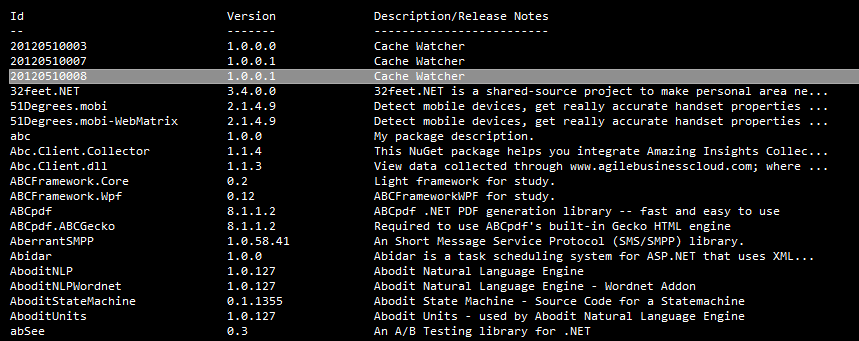
Command: Get-Package -ListAvailable 

Gets you list of all packages that are available for you to install. 
Executing the command looks like: 


Get existing packages in your project

Command:  Get-Package -ListAvailable -Filter [package name]
Example Command:  Get-Package -ListAvailable -Filter Castle.Core
 
 
 Search for name based on contains filter. Where instead of [search Package] 
you use name you are looking for.


Get existing packages in your project

Command:  install-package [package name] 
 
Example Command:  install-package Castle.Core
 
 
Notice the highlighted are on image below. Make sure you select the project where you want to install the package.


And after installing you will get message.


Remove package from your project

Command:  uninstall-package [package name] 
 
Example Command:  uninstall-package Castle.Core
 
  
Remove the package from project, again make sure that you have selected project you want to remove the package from, as highlighted on image below.


Hint: 
If you do not already know the name of the package you want to remove, enter Get-Package at the prompt 
without any flags to see a list of all of the packages that are currently installed.  


Include pre-release package

If you are like me, you want to get your hands on data that are still in beta version. This command will allow you to do this.
 
 
Command:  install-package [package name] -includeprerelease 
Example Command:  uninstall-package EntityFramework -includeprerelease  

Install specific version

Quite often you need to install package specific to your project, from time you have started to write it. 
  

Command
Install-Package EntityFramework -Version 1.2.0


Commands:


Enable migrations:

 
Command:  Enable-Migrations 

To see more go and visit Package Manager Console Powershell Reference